
A quick column name fix with Regex for reading YFinance data with Polars

So, recently I encountered this problem when reading data with Polars:

There’s this complicated version where, when sub-setting data, I would need to write the parenthesis, actual column name, and the symbol. And if you’re wondering or confused on what the actual column names are:
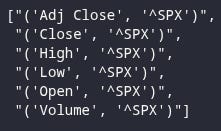
It’s literally what it is about the values, which is not ideal. So I decided to use Regex to to fix this.
pattern = r”’([\w+\s*]+)’”
rets.columns = [re.search(pattern, col).group(1) for col in rets.columns]
So, what the Regex pattern does, is that it captures what’s between the single quotes.
Then, we have a parenthesis, which basically stands for a group. The reason we have a group is because we don’t want to capture the actual single quotes but only what’s between them.
The square brackets are for matching a set of characters, called a character class, instead of just individual characters.
The \w captures all alphanumeric characters including the underscore.
The + means one or more occurrences of the previous character or expression.
The \s is for capturing whitespace, which includes both space and tabs.
The * after the white space means zero or more occurrences of the previous character or expression, which is whitespace. We could’ve also used the ?, which means zero or one occurrence of the previous character or expression, but whatever works works.
The + after the square bracket means that the character class must match one or more times.
Now, for renaming the columns, since rets.columns gave us the columns list, we can use a list comprehension to iterate over it and use the regex library to search for our pattern and use that result as new columns. We also use the group method, and use group 1. If we used group 0, it would just return the same thing but with the single quotes.
Our final result:


Beautiful!
I hope this helped you out if you were experiencing this problem.